Syntax
A sketch is a list of top level blocks. Each block starts with one of these keywords:
StaticAspect UseCase DTO Identifier Value External Activity Flow Statechart Doc
Keywords are case sensitive. Sections and comments can go between blocks.
The parser stops at the first line with a syntax error. The diagrams then do not include the rest of the sketch. After you paste a large part, examine the Issues panel and count the diagrams.
Names
| Where | Allowed |
|---|---|
| Components, DTOs, identifiers, values, operations, parameters, types | Letters and digits. Components start with a letter |
| Flow step labels | Letters, digits, _ and spaces |
| Flow lane names | Letters and digits |
| Block names in quotes | Anything but " |
You can quote the names of StaticAspect, UseCase, Flow, Activity and Doc blocks.
StaticAspect
Use a static aspect to list the components of the architecture. Start here.
When a system has parts that you want to show apart, give each part a named aspect. Two aspects with the same name cause an error.
Components
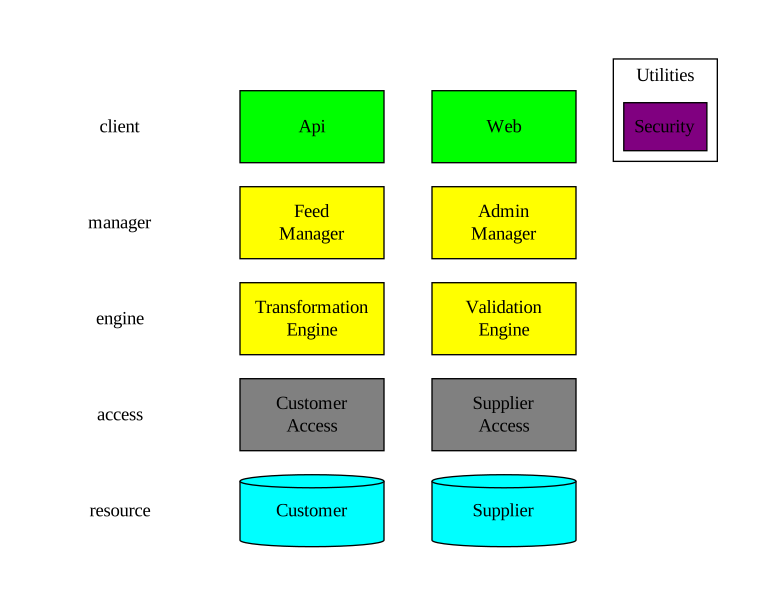
The end of a component name gives the component type: Client, Manager, Engine, Access, Resource or Utility. Separate components with whitespace.
Resource types
A resource with no suffix is relational. Put the suffix on the resource in the StaticAspect. In a use case, write the name without the suffix.
| Suffix | Resource |
|---|---|
none or :r | Relational |
:a | API |
:f | File |
:n | NoSQL |


UseCase
Use a use case to check the architecture against one path through the system. Each use case gives a call chain and a sequence. When you add call detail, the use case also gives a DTO flow.
Each line is a call from one component to another. Declare the components in a StaticAspect. Declared components show in the static aspect diagram.
Synchronous call


Asynchronous and queued calls
Use a queued call when the caller must not wait for the result. A manager can call another manager only with :a or :q.
Put the transport before the >. :a is asynchronous. :q is queued. :s is synchronous, which is also the default.


Annotation
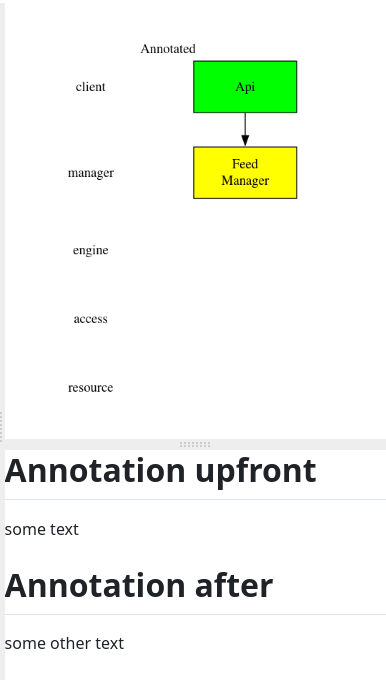
Use an annotation to say what a reviewer must look at, or why a call is there. Put Markdown between two @@@ lines. The Annotation panel shows the annotation next to the diagram.
CallDetail
Add call detail in Detailed Design, when the call chains hold up. Call detail names the operations and the DTOs that each operation takes and returns. The generator turns the call detail into the contracts. Write the call detail between the - and the > of the arrow.
Operation name

Operation name, queued

Facet and operation name
Start a facet name with I.

Context, facet and operation name

Request type

Request type and parameter name

Context request type and parameter name

Several parameters
Separate parameters with commas. The parameters match by position. Use the same order in all use cases.
A parameter type is a name only. To send a list or a nullable value, send a DTO with a property of that type.
Response type
Write the response type before the operation name.

Context response type

Generic wrapper
A response can have one generic wrapper.

DTO
Declare a DTO to give a request or a response its properties. Until you declare the DTO, the generator makes an empty class.
Write each property as Type Name. Separate the properties with spaces or new lines.
Name only
The DTO matches by name in all components that use the DTO.
Property types
A property type can be generic, an array or nullable.
Inheritance
Context
Facet and name
The DTO matches in that facet only. The facet name must start with I. If the facet name does not start with I, the parser ignores the DTO.
Facet, context and inheritance
Abstract
Mark a DTO abstract when another DTO has a property of that type.
Identifiers and values
Use an identifier or a value in place of a bare primitive, so that the type name says what the value means. An identifier or a value holds one primitive type. The generator makes each identifier and each value as a partial struct, so that the projects build when an enforced DTO uses one. You write the rest of the code. The enforcer does not examine identifiers or values.
The primitive types are bool byte sbyte char decimal double float int uint long ulong short ushort string Guid.
Add a note in @@@ after the type.
Identifier
The generator gives each identifier the StronglyTypedId attribute, and puts identifiers in the namespace Common.Identifier.
Value
The generator gives each value the Vogen attribute, and puts values in the namespace Common.Value.
External
Use External for a type that comes from a package or from another system. The generator uses the type and makes no class for the type.
Add the namespace of the type. The generator then adds a using for the namespace.
Put a facet before the name to make the type external to that facet only. All other contracts keep their own copy. A facet after the name is the component that owns the type. The using comes from that component.
Use a facet in an External when one side cannot map the type. An example is a workflow utility that controls a manager.
External event
Use External:e for an event facet that another system defines. The sketch receives the event. The generator makes no contract for the facet. The diagrams of the event payload still show.
Activity
Use an activity diagram for logic in one component that a call chain cannot show. The body is PlantUML activity diagram syntax. The pad sends the body to PlantUML with no change. Examine the diagram for errors. Each { in the body must have a }.

Flow
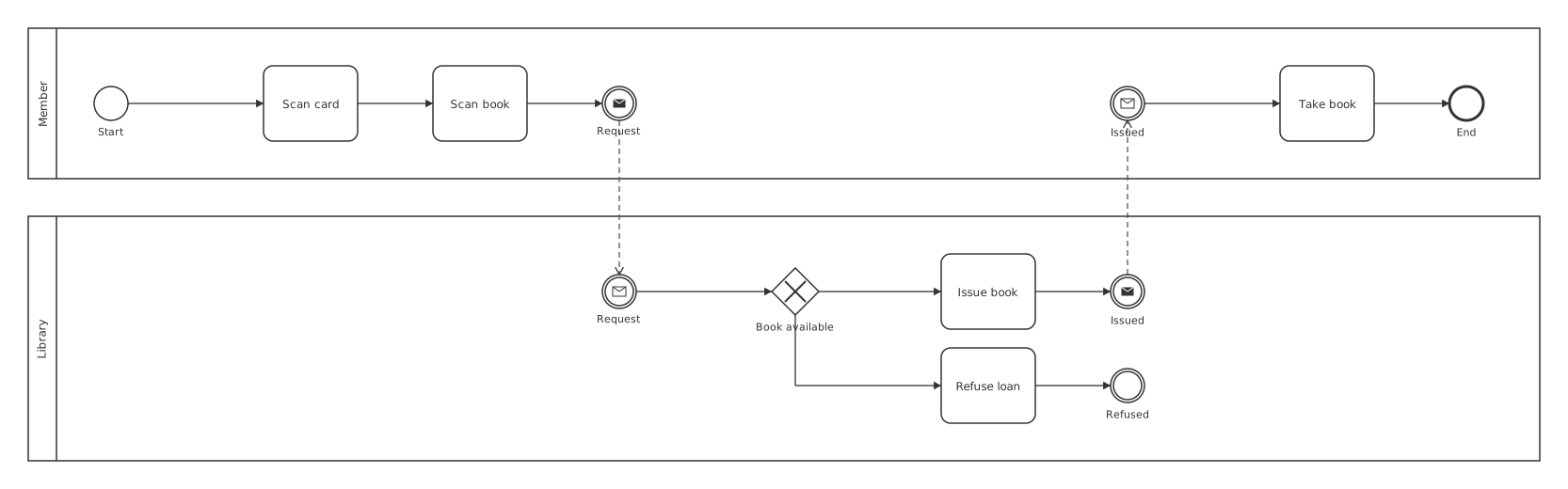
Use a flow for a business process that goes across people and systems. Draw the flow before you design the components, to find the use cases. A flow is a BPMN process. A flow has lanes, and each lane has steps.
Lanes
@Name starts a lane. The steps after @Name are in that lane until the next @.
Steps
| Step | Written |
|---|---|
| Task | Scan book |
| Event | (Start) (End) |
| Gateway | <Book available,Refuse loan> |
| Send a message | `(Request>>@Library |
| Receive a message | `(Request<<@Member |
| Timer | (Wait<T) |
End every step with , or ;. A , draws a sequence arrow to the next step. A ; ends the chain. Steps after a ; start a new chain in the same lane.
Gateways
The first name in a gateway is the gateway label. Each name after the label is a branch to the step with that name in the same lane. Do not put a space after the comma. The step after the gateway is the main path.
Messages
A message connects two lanes. The send step names the other lane and the step that receives the message. The receive step names the lane of the sender and the step that sent the message. Give the two steps the same name.
Step names
Each step name in a lane must be unique. A lane can have only one (Start) and one (End). Give other end events a different name, for example (Refused).
Layout
The pad makes the layout of a flow. When you move items in the diagram editor, the pad writes the item positions in a folded [v1 …] block after the closing }. Do not edit this block.
Statechart
Use a statechart when a service must remember where a long process is, for example an order that waits for payment. Each statechart belongs to one service, and a service can have more than one.
The chart holds no logic. The chart names each event, each guard (a condition on a transition), each action and each call. When you implement the service, you map each name to a method on the service. For example, the guard PaidInFull maps to a method that checks the payment.
A UML state machine diagram can show only a subset of what a statechart can hold.
Write the keyword as Statechart. The pad also accepts the older spelling StateChart.
Declare the service in a StaticAspect.
States
A state is a name, or a name with a body. Names must be unique in the chart. The first state in a body is the initial state.
Add a suffix for the other kinds of state.
| Suffix | State |
|---|---|
:p | Parallel. Each child is a region, and all regions run at once |
:f | Final |
:h | Shallow history |
:h* | Deep history |
Transitions
Write each transition inside the source state. The event goes between - and >, with an optional guard in brackets. A guard is one name.
Separate several targets with commas, -Split> Packing, Invoicing.
A transition at the top of the chart can occur from all states.
-> has no event. From a state with children, the transition occurs when that state finishes. From a state with no children, write a guard in the arrow, -[Guard]>, and the transition occurs when the guard is true. A -> with no guard occurs at once. The chart tries the transitions in order, so put -> last.
Actions and raises
>> Name is an action: work that does not change the next state, for example a notification. ^Name raises an event in the chart. A transition in the same chart must handle the event.
After a transition or a state with no body, an action or a raise is part of that transition or state. In other positions in a body, it occurs when the chart enters that state.
Calls
Use a call when the result of work selects the next state, for example a stock check. An action cannot do this, because the chart selects the transition before the actions run.
Write the call after the state name and a /. The chart runs the call one time, when it enters the state. In that state, -[Guard]> and -> occur when the call returns a result. The first transition with a true guard occurs, so make the last one ->, with no guard. -!> occurs when the call has a business failure.
A state with a call and no -> runs the call and stays in the state, for example to send a reminder. A state has one call, and the state cannot have child states. For two steps of work, use two states.
Manager charts
A chart that a manager owns can also have sessions and timeouts. A session is a DTO, a property of a DTO, or both. A timeout is a name. The implementer sets the duration.
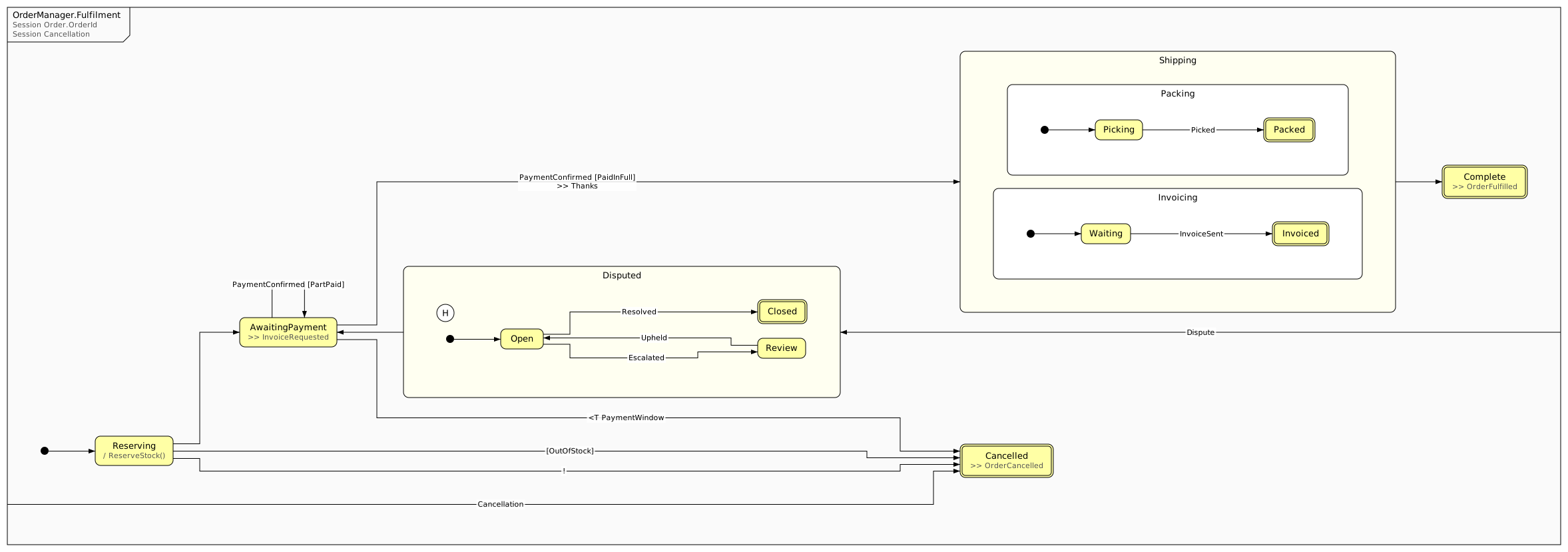
Generating
The generate script writes each chart into a folder in the project of the owning service. Set the format and the folder in Sketch Settings, under Statecharts. The format is XState JSON or SCXML. The default folder is StateCharts.
XState JSON holds all of the chart. SCXML holds states, events and raises only: it cannot hold guards, timeouts, actions or calls as names. If the format is SCXML and the chart has one of these, you get a warning.
A file is named Chart.vN with the next version number. The script writes a new version only when the chart changes. The script keeps all earlier versions.
Doc
Use a doc for notes on the whole design, for example an overview or a decision. A doc is a page of Markdown. The Artifacts panel and the Annotation panel show the doc.
A doc must have a @@@ block.
Section
When the sketch gets long, use sections. A section puts the blocks that follow into a group in the navigation panel. You can fold a section in the editor. Put the name in quotes. A | with no name ends the section.
A new | "Name" ends the current section and starts the next section.
Comments
// starts a comment to the end of the line. /* */ contains a block comment. You can put a block comment in a block comment.
Use only these two comment types. The parser stops at a line that starts with # or --.